Traveling to Japan? Stay connected with an affordable prepaid Japan eSIM from TripHappy.ph and our eSIM partner. Choose from flexible data plans and validity periods, receive your QR code digitally, and enjoy mobile internet without swapping your physical SIM.
Tried and tested in Japan by our team! We recorded actual speed tests in Ginza, Tokyo, and Narita Airport. Enjoy convenient booking through a 24/7 Messenger chatbot and local Philippine-based assistance.
Japan eSIM at a Glance
- Tried and tested in Japan – Actual speed tests in Ginza, Tokyo, and Narita Airport.
- Flexible prepaid plans – Different data allowances and validity periods.
- Affordable rates – Sample 7-day plans start at ₱193 for fixed data and ₱301 for unlimited data.
- Easy online booking – Choose your plan and pay through the 24/7 Messenger chatbot.
- Digital QR-code delivery – Receive your eSIM after successful payment through supported automated payment methods.
- Keep your Philippine SIM – Continue receiving calls, texts, and bank OTPs, subject to roaming availability.
- Local PH assistance – Additional support from TripHappy.ph through Messenger.
Japan eSIM Plans & Prices
Choose from prepaid Japan eSIM packages with different data allowances and validity periods. Below are sample rates for 7-day plans for reference.
| Unlimited Data Plans – Sample 7-Day Rates | ||
|---|---|---|
| Data Package | Sample Price | Suggested Usage |
| Unlimited Standard | ₱301 | Navigation, messaging, social media, and everyday browsing |
| Unlimited Plus | ₱489 | Higher daily high-speed data allowance for frequent photo and video uploads |
Note: Unlimited plans may have daily high-speed data allowances, with reduced speeds after reaching certain usage limits.
| Fixed High-Speed Data Plans – Sample 7-Day Rates | ||
|---|---|---|
| Data Package | Sample Price | Suggested Usage |
| 3GB | ₱193 | Navigation, browsing, and social media |
| 5GB | ₱241 | Moderate usage during a 5–7 day trip |
| 10GB | ₱421 | Frequent social media, photo, and video uploads |
Important: Prices are sample rates for 7-day plans only. Other validity periods and data packages may be available. Rates, packages, and conditions may change without prior notice. Check the Messenger booking chatbot for the latest options and prices.
View All Japan eSIM Plans & Book
Explore available packages through our partner, 3UK Philippines, using its 24/7 Messenger chatbot.
The chatbot guides you through choosing your destination, travel duration, and expected data usage before recommending available eSIM packages. You can then select your preferred payment method and complete your purchase.
You’ll be directed to 3UK Philippines. Tap Get Started to begin booking and payment.
Prefer WhatsApp assistance?
Request the WhatsApp booking link through TripHappy.ph.
Tried & Tested: Actual Japan eSIM Speed Tests
Our team tested the Japan eSIM in two locations using an iPhone 15 Pro Max. These real-world results provide an idea of its mobile data performance.
| Test Location | Download | Upload |
|---|---|---|
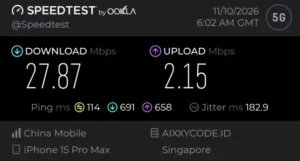
| Ginza, Tokyo (5G) | 27.87 Mbps | 2.15 Mbps |
| Narita Airport (LTE) | 18.38 Mbps | 3.92 Mbps |
Actual Speed-Test Screenshots
Ginza, Tokyo – 5G
Narita International Airport – LTE
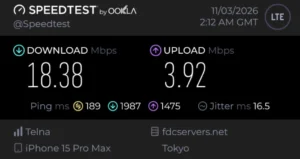
Some Speedtest network and server labels may show other countries due to international eSIM network routing.
These are actual test results, not guaranteed speeds. Performance varies by location, device, and network conditions.
Why Choose a Japan Travel eSIM?
No Physical SIM Card Needed
- Skip the hassle of buying a physical SIM card at the airport. An eSIM installs digitally on a compatible smartphone without replacing your existing SIM.
Activate Before Your Flight
- We recommend installing and activating your Japan eSIM on the day of your flight, while you’re still in the Philippines, with a stable Wi-Fi connection.Your plan’s validity countdown begins upon activation, so activating it several days before departure would use up part of your validity period.By preparing your eSIM before boarding, you can connect more conveniently when you arrive in Japan. Follow the activation instructions provided with your plan.
Keep Your Philippine SIM Active
- On compatible dual-SIM smartphones, you can use the Japan eSIM for mobile data while keeping your Philippine SIM enabled for calls, SMS, and bank OTPs.Reception depends on your Philippine mobile provider’s roaming service, and separate roaming charges may apply.
Philippine-Based Assistance
- Our eSIM partner provides a 24/7 automated Messenger booking assistant for plan selection and payment.
You may also contact TripHappy.ph through Messenger for additional assistance during our regular office hours.
How to Buy and Activate Your Japan eSIM
Follow these steps to purchase, install, and use your Japan eSIM.
Step 1: Open the 24/7 Messenger Chatbot
Open the 3UK Philippines Messenger business chat to start your booking.
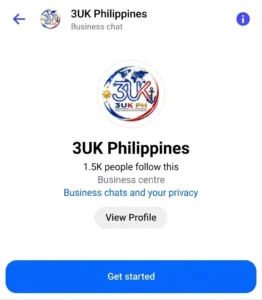
Tap Get Started to begin. For WhatsApp assistance, contact TripHappy.ph and request the booking link.
Step 2: Choose Your Destination and Plan
The chatbot will ask for your:
- Destination (Japan)
- Preferred validity period
- Expected data usage
It will then recommend available eSIM plans with their corresponding prices.
Step 3: Choose Your Payment Method
Available payment options include:
- GCash
- Maya
- MariBank
- UnionBank (bank transfer)
- BPI (bank transfer)
- QR Ph – GCash, Maya, or participating banking apps
- Credit or debit card
- PayPal
For GCash, Maya, QR Ph, and supported Philippine bank payments, the chatbot provides a secure payment link. Follow the payment instructions; no payment screenshot is needed.
For PayPal, the chatbot provides a payment link and the exact amount in USD. Submit your receipt for confirmation after payment.
Step 4: Receive Your eSIM QR Code
For supported automated payment methods, your eSIM QR code is sent directly through Messenger within a few minutes after successful payment.
For PayPal, follow the receipt submission and confirmation instructions in the chat.
Step 5: Install and Activate Before Your Flight
We recommend installing and activating your Japan eSIM on your departure day while still in the Philippines and connected to stable Wi-Fi.
Follow the QR-code installation instructions for your device. Your plan’s validity countdown begins upon activation, according to the supplier’s terms.
Step 6: Connect When You Arrive in Japan
Upon arrival, select your Japan eSIM for mobile data and enable Data Roaming for that eSIM as instructed.
Your phone can then connect to an available supported mobile network in Japan.
Is Your Phone Compatible with eSIM?
Before purchasing, make sure your smartphone:
- Supports eSIM technology
- Is network-unlocked
- Can install and activate an additional mobile data plan
Many newer iPhone, Samsung Galaxy, Google Pixel, and other Android models support eSIM. Compatibility depends on the specific model, region, and carrier.
Note: These travel eSIM plans are data-only and do not include a separate phone number for regular cellular calls or SMS.
Traveling to Japan by Cruise Ship?
Planning a cruise from Manila to Japan, such as an Adora cruise? A Japan eSIM can be useful for mobile internet during port visits and while your ship is near the coast.
Important: Mobile data works only when your ship is within supported port or coastal network coverage. It does not provide internet connectivity on the open sea.
If your cruise includes stops in different countries, check which destination-specific or regional eSIM plan is suitable for your itinerary.
Japan eSIM – FAQ’s
1. When should I activate my Japan eSIM, and when does the validity period begin?
We recommend activating your eSIM on the day of your flight, while you’re still in the Philippines and connected to Wi-Fi. The validity countdown begins upon activation, so activating it too early may use up part of your plan before you arrive in Japan. Follow the supplier’s activation instructions.
2. Will my Japan eSIM work as soon as I arrive?
Once correctly installed and activated, your eSIM can connect to a supported network in Japan. Select your travel eSIM for mobile data and enable Data Roaming for that eSIM as instructed.
3. Can I keep my Philippine SIM and still receive bank OTPs?
Yes, on compatible dual-SIM smartphones, provided your Philippine mobile provider supports SMS roaming. Your bank may also have additional restrictions, and roaming charges may apply.
4. Does the Japan eSIM include a Japanese phone number?
No. These are data-only plans, but you can continue using internet-based communication apps such as Messenger, WhatsApp, and Viber.
5. How fast is the Japan eSIM?
Our team recorded download speeds of 27.87 Mbps in Ginza, Tokyo, and 18.38 Mbps at Narita Airport. Actual speeds vary depending on location, device, and network conditions.
6. Is unlimited data really unlimited?
Unlimited plans may have daily high-speed data caps, with reduced speeds after reaching certain thresholds. Check the current package details before purchasing.
7. How do I pay, and when will I receive my eSIM QR code?
Our partner’s 24/7 Messenger chatbot accepts GCash, Maya, MariBank, UnionBank, BPI, QR Ph, credit/debit cards, and PayPal.
For supported automated payments, your eSIM QR code is sent directly through Messenger within minutes after successful payment. PayPal transactions require receipt submission and confirmation.
8. Can I use my Japan eSIM while on a cruise ship?
Yes, when your ship is in port or within supported coastal mobile network coverage. Regular travel eSIMs do not provide connectivity on the open sea. If your cruise visits multiple countries, check with the booking chatbot for a suitable plan.
Ready to Stay Connected in Japan?
Travel with convenient prepaid mobile data and an eSIM that has been tried and tested in Japan by our team.
Choose your preferred data package and book securely through our partner’s 24/7 Messenger chatbot.
You’ll be directed to 3UK Philippines. Tap Get Started to begin.
Prefer WhatsApp?
Request the WhatsApp booking link through TripHappy.ph.
Need Additional Assistance?
For booking, payment, QR-code delivery, and technical questions, use the partner’s Messenger chatbot.
For backup assistance, contact TripHappy.ph directly:
Triphappy office hours: 9:00 AM–5:00 PM Philippine Time, daily.
Triphappy.ph offers travel eSIMs in partnership with 3UK Philippines. Purchases and eSIM fulfillment are handled through our partner’s booking channels. Sample prices, package availability, data allowances, network coverage, speeds, and other terms are subject to the supplier’s current conditions.